We are increasingly seeing companies asking us this question. Warehouse Management System (WMS) and Enterprise Resource Planning (ERP) are two different tools with different functions that are often mistakenly confused. Read on to learn what the differences are and which companies are best suited for them.
How warehouse management works in an ERP system
ERP (Enterprise Resource Planning) refers to corporate information systems that provide companies with tools for business management. In an ERP system, you will find modules for accounting, business management, human resources, service and even warehouse management.
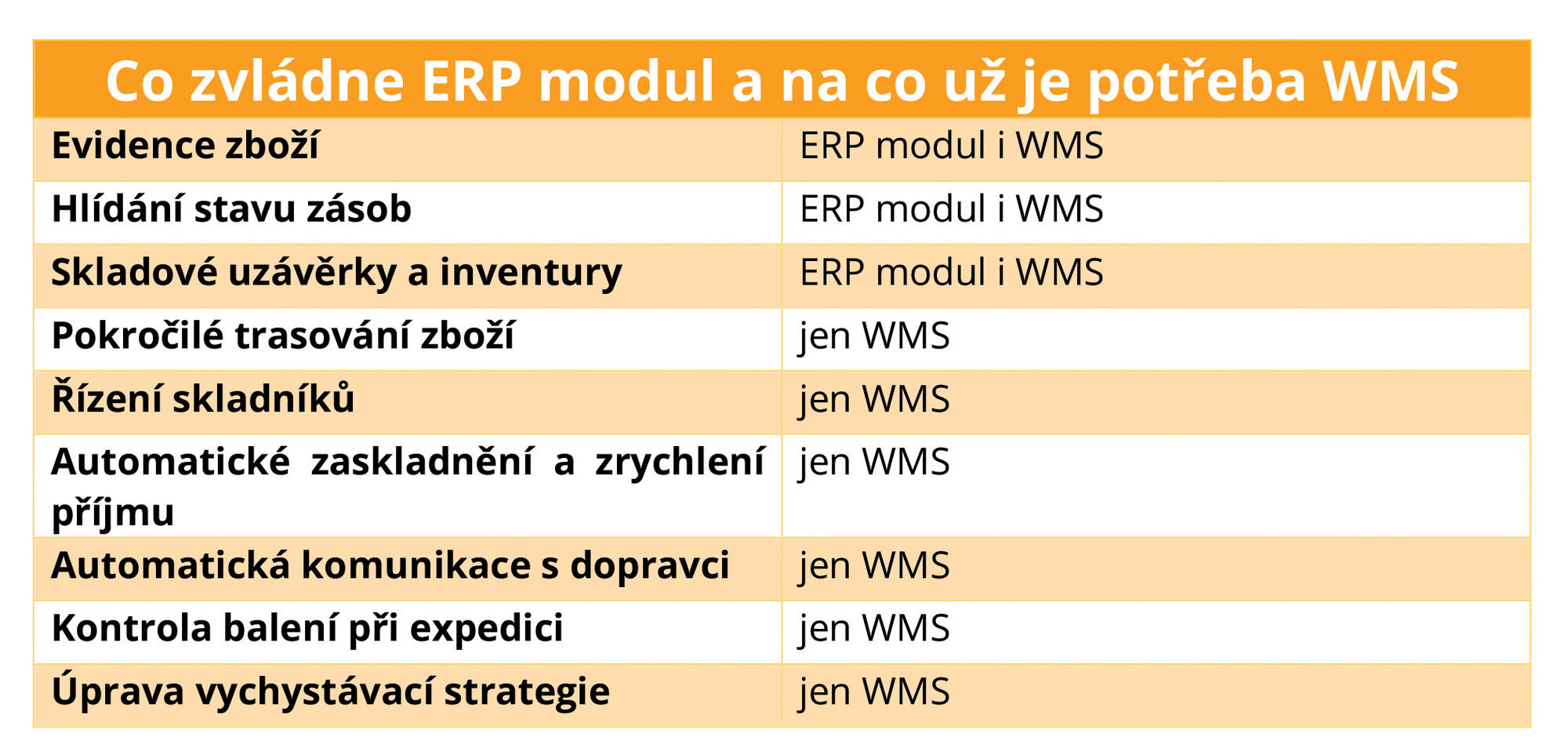
In the warehouse management module, you can solve, for example:
- records of goods and materials (name, code, quantity),
- monitoring of inventory levels,
- warehouse closings and inventories,
- order picking (usually in combination with the order module).
Thanks to the ERP module, you have an overview of how many pieces of each item you have in stock. However, you do not manage the warehouse in the true sense of the word.
How a warehouse management system (WMS) works
WMS (Warehouse Management System) is a separate tool that automates and manages warehouse operations and processes. It manages work in the warehouse according to a set logistics strategy so that processes work as efficiently as possible. For example, it finds the shortest possible route to the goods for warehouse workers, reduces the risk of goods being mixed up, allows the use of various storage and retrieval strategies, or manages work with expirations.
The main differences between warehouse management in ERP and WMS
The fundamental difference between the two systems is that ERP records the status of the warehouse, while WMS actively manages the warehouse. Warehouse workers are equipped with readers with displays on which the WMS shows them which goods to pick and the shortest route to them (based on an individual and optimized mathematical algorithm). As soon as they reach the goods, they scan their barcode and the reader confirms that they have the correct item - this system reduces the risk of mixing up goods.
ERP systems offer mobile warehouse solutions, but these usually only show warehouse workers the shelf number and the goods, which they have to find their way to themselves. Only WMS can provide optimal guidance using a mathematical algorithm .
Another added value that WMS offers compared to ERP is advanced goods addressing . Most warehouse modules in ERP allow basic addressing, i.e. assigning goods to warehouse positions. WMS goes a step further in this and, for example, automatically determines bins according to a specific type of goods immediately after they are put into storage - it recommends placing large and heavy goods on the lower shelves, fast-moving goods as close to shipping as possible, and so on.
This is related to another added value of WMS, namely the simplification of goods receipt . When receiving, the warehouse worker only reads the code of the goods (or entire pallets) and the WMS automatically sends it to the optimal location in the warehouse according to the storage strategy.
Who will need a warehouse module in ERP, and who should use a WMS?
When deciding whether you can do with an ERP module or if you need a WMS, you should primarily consider the scope of warehouse operations . "For a hand-held warehouse, an ERP module is usually sufficient. However, if a company is struggling with warehouse workers taking a long time to look for goods, there are many returns, or the warehouse is unable to handle a large number of orders during peak hours, it should consider a WMS, " advises Miroslav Králík, Delivery Manager of the LOKiA WMS system.
Both ERP and WMS are universal systems suitable for all types of companies with warehouses – it doesn't matter whether you have an e-shop with clothes or you manufacture aircraft parts. Previously, WMS was the domain of large companies, but in recent years, available cloud-based options have appeared, thanks to which small and medium-sized companies are also implementing WMS.
If you are considering upgrading the warehouse module in your ERP system to a WMS, define measurable goals that you want to achieve, for example:
- speed up order processing time,
- manage seasonal peaks even without temporary workers,
- reduce the number of customer complaints and returns.
Calculate the ROI (return on investment) and decide whether the system is worth it. In this regard, a cloud-based WMS option is more suitable, as it does not require as large an initial investment as an on-premise solution.
Connecting WMS and ERP systems
As we wrote above, WMS can do more than a warehouse ERP module, but for maximum efficiency , we recommend connecting it to another system , from which it will, for example, receive orders or to which it will send data for accounting. Large companies typically connect it to ERP, smaller ones to an accounting program or e-shop.
You connect the systems using a standardized API interface, thanks to which they can exchange data with each other . Orders flow from the e-shop or ERP system to the WMS, and the WMS in turn continuously sends data on the status of goods or documents, such as orders or receipts to the warehouse.
This is how, for example, the connection of our LOKiA WMS solution with the Pohoda accounting system or the connection with ABRA Flexibee works.
If you are considering connecting your ERP system to a managed warehouse, please contact us using the form below. Together we will evaluate whether WMS is the right solution for you.
Ready to end the chaos in your company?
During a free consultation, we will review your current setup and recommend the next steps based on what your company actually needs.